

Scissors & Forceps,
Candidate Application Management System V1.0
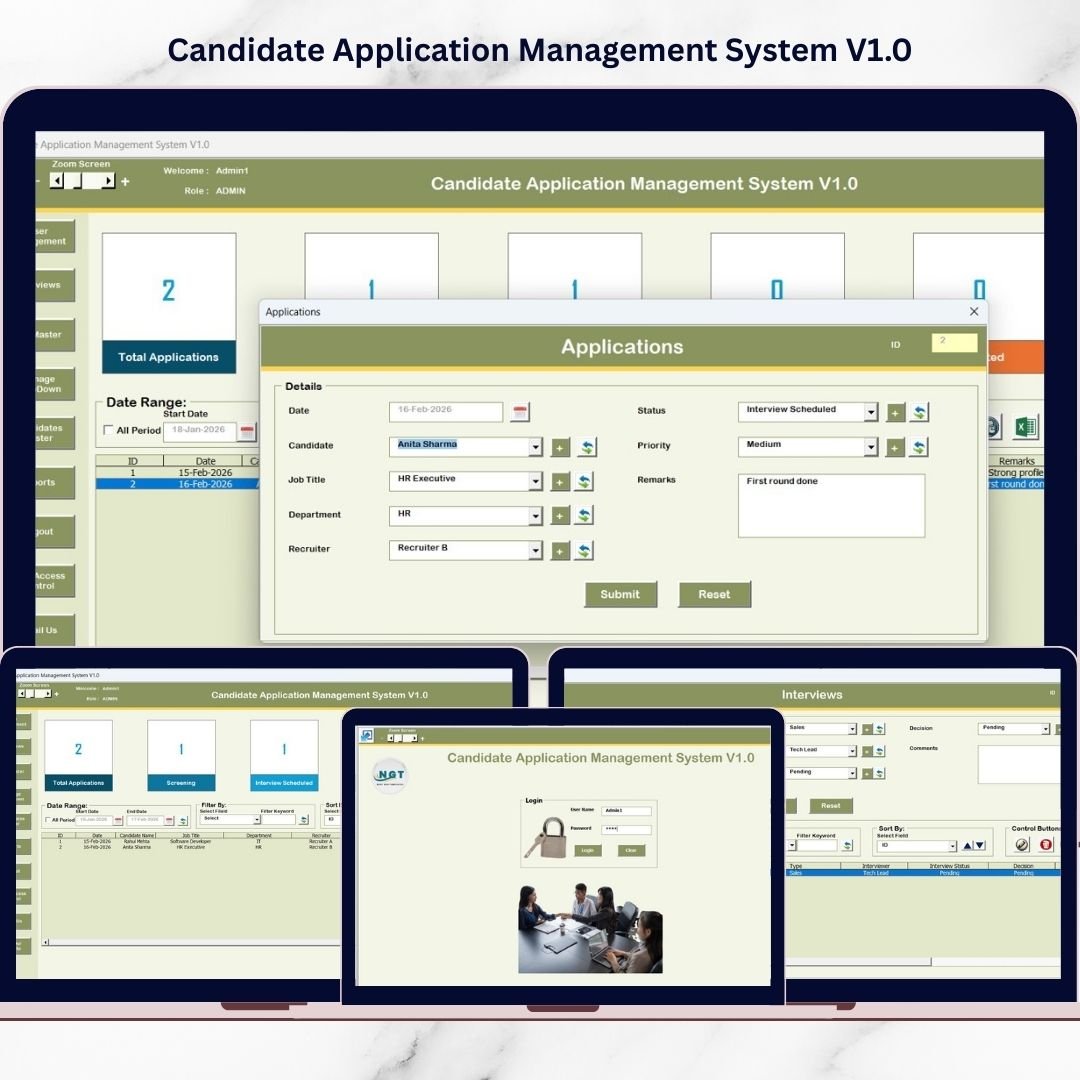
Hiring the right talent requires more than collecting resumes. It demands structured tracking, proper filtering, interview monitoring, secure user access control, and organized reporting. Unfortunately, many HR teams still rely on scattered Excel sheets or manual registers. As a result, data gets misplaced, follow-ups are delayed, and hiring decisions slow down. Now, you can solve all these problems. Introducing Candidate Application Management System V1.0 — a professional Excel VBA-based recruitment management system designed to centralize and automate your entire hiring workflow. This ready-to-use digital product runs directly inside Microsoft Excel Desktop, so you do not need expensive HR software or subscription-based platforms. �� Secure Login System The system begins with a professional Login Form that ensures data security through role-based access. Default Login Credentials Admin RoleUsername: Admin1Password: abcd User RoleUsername: User1Password: abcd Simply enter credentials and press Login (or hit Enter). The system opens the main control panel instantly. Admin and User roles can have different access permissions, ensuring secure recruitment data handling. ��️ Main Application Dashboard – Central Recruitment Control Candidate Application Management System After login, you enter the Main Application Form — the core control center of the system. �� Central List Box The structured List Box displays all candidate records clearly and professionally. You can: View candidate details instantly Select records for editing or deletion Manage large recruitment databases efficiently �� Advanced Filtering Options Filter candidate data by: Date range Specific columns Custom parameters This enables quick searching and shortlisting within seconds. �� Sorting Feature Organize candidate records using smart sorting functionality.Improve analysis, streamline workflows, and maintain structured recruitment tracking. ��️ Powerful Control Buttons The system includes essential action buttons: ✔ Add New Record Add candidate details quickly. ✔ Update Existing Record Select a record and update instantly — or double-click for faster editing. ✔ Delete Record Remove incorrect or outdated entries securely. ✔ Export to Excel Export filtered data into a new Excel file for reporting or sharing with management. �� History Form – Easy Data Entry & Editing The History Form allows: Adding new candidate records Editing existing applications Submitting updates securely This ensures your recruitment database always remains accurate and up-to-date. �� Full Navigation Menu – Complete System Control The left-side navigation panel gives access to all modules: �� Firm Information Update company details easily. �� User Management Add new users Update details Delete users Reset passwords Change passwords �� Manage List Customize dropdown lists and system values. �� Interviews Track interview scheduling and details. �� Job Master Manage job positions centrally. �� Candidates Master Maintain structured candidate master records. �� Reports Module Generate Excel reports by selected date range. Perfect for: Monthly recruitment reporting Hiring pipeline analysis Management presentations �� User Access Control (Admin Only) Define access permissions for User roles.Enhance data protection and operational control. �� Logout Securely saves data and closes the application. �� Email Support Request customization directly. �� Website Redirect Explore more professional Excel tools. �� Why This Tool Is Better Than Manual Tracking Many organizations face these challenges: Disorganized candidate records No centralized system No access control Delayed reporting High cost HR software This Excel-based recruitment management system solves everything without recurring fees. You get a professional applicant tracking system inside Excel. �� Who Should Buy This? HR Managers Recruitment Agencies Placement Consultants SMEs & Startups Corporate HR Teams Business Owners Hiring Regularly If you hire talent frequently, this system will save you hours every week. �� Key Benefits ✔ Structured candidate database✔ Secure role-based login✔ Smart filtering & sorting✔ Interview tracking system✔ Exportable Excel reports✔ Customizable modules✔ No subscription fees✔ One-time purchase solution✔ Works offline ⚠ System Requirements (Important) Please ensure compatibility before purchase: ✔ Windows 10 and above✔ Microsoft Excel 2010 or above✔ Works only on Microsoft Excel Desktop (Laptop/Desktop)❌ Not compatible with Mac OS❌ Not supported on Mobile or Tablet devices This tool runs exclusively on Windows-based Excel Desktop. �� How It Improves Hiring Efficiency Using this system, you can: Reduce manual errors Track applications systematically Improve interview coordination Generate instant recruitment reports Control user permissions securely Increase hiring productivity It transforms your recruitment process into a structured digital workflow. ❓ Frequently Asked Questions Is this web-based software?No. It runs inside Microsoft Excel Desktop. Do I need VBA knowledge?No. It is fully ready-to-use. Can it be customized?Yes. Customization support is available. Is internet required?No. It works offline. Is it subscription-based?No. It is a one-time purchase digital product. �� Video Tutorial Visit our YouTube Channel for step-by-step demonstrations:�� Youtube.com/@PKAnExcelExpert �� Final Call to Action Stop managing recruitment in scattered spreadsheets. Upgrade to a professional, secure, and structured hiring system today. �� Purchase Candidate Application Management System V1.0 now and streamline your hiring workflow instantly. �� Click here to read the Detailed blog post Visit our YouTube channel to learn step-by-step video tutorials Youtube.com/@PKAnExcelExpert Watch the step-by-step video tutorial:
$ 18.87